
Download Direct MP3 Recorder Free – Audio Capture, MP3, OGG, WAV, WMA
Overview
Direct MP3 Recorder Free is a mobile audio capture tool designed to simplify the process of recording sound directly from a device’s audio sources. The app serves as a utility for users who need to record voice, music, or system audio with minimal setup. Its primary purpose is to provide reliable audio capture across multiple input types, making it suitable for students, content creators, podcasters, and casual users who require on-the-go recording capabilities.
The app addresses common challenges in audio recording, such as complex navigation, limited format support, and lack of scheduling features. By offering straightforward access to recording functions and multiple output formats, it reduces friction in the recording workflow. The inclusion of scheduled shutdown functionality also helps manage device resources during extended sessions, particularly useful for background recordings or time-limited captures.
Target users include individuals who rely on audio for documentation, study notes, interviews, or personal projects. While the developer did not provide additional background information, the app’s design suggests a focus on usability and accessibility. Real-world use cases include capturing lectures, recording live performances, or archiving audio from streaming services. In the broader app ecosystem, Direct MP3 Recorder Free fills a niche for lightweight, no-frills audio tools that prioritize functionality over advanced editing features.
Key Features & Functionality
- User-Friendly Interface: The app features a clean, intuitive layout that prioritizes ease of access. Even users unfamiliar with audio recording software can begin capturing sound immediately without extensive tutorials.
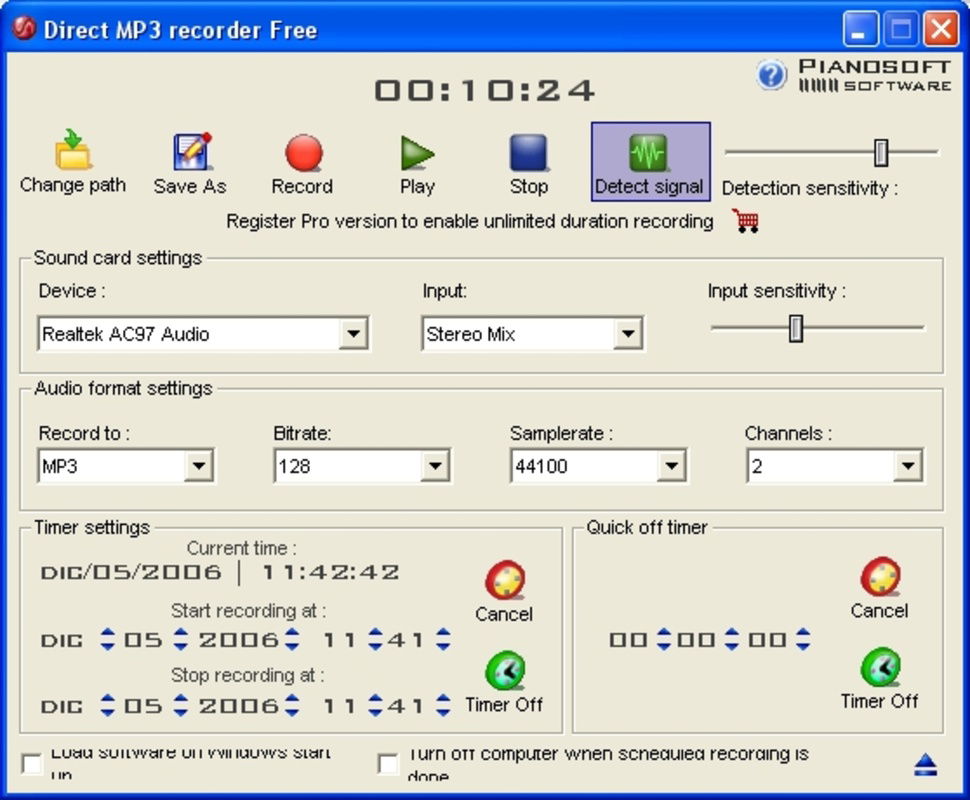
- Multi-Format Support: Direct MP3 Recorder Free supports four audio formats: MP3, OGG, WAV, and WMA. Each format allows users to adjust quality settings, enabling optimization for file size or audio fidelity based on their needs.
- Flexible Input Sources: Users can select from various input sources, including the system microphone, real-time audio playback, line-in, and phone line. This versatility supports diverse recording environments, from voice memos to live audio capture.
- Scheduled Recording & Auto Shutdown: The app allows users to set recording schedules and automatically shut down both the application and the device after completion. This is particularly useful for overnight recordings or unattended sessions.
For example, a student might use the app to record a lecture via system audio while attending class remotely, then schedule the app to shut down after the session ends. A podcaster could use the line-in option to record from an external microphone and save the output in WAV for high-quality post-production. The ability to switch between formats ensures compatibility with different platforms and devices.
Interface, UX & Performance
The user interface of Direct MP3 Recorder Free is designed with simplicity in mind. Navigation is linear and consistent, with key functions such as start, stop, and format selection clearly labeled and accessible from the main screen. Visual feedback during recording, such as waveform visualization or status indicators, enhances user awareness of ongoing activity.
Interaction flow is straightforward: users select an input source, choose a format and quality, set any scheduled parameters, and begin recording with a single tap. The app maintains responsiveness across different device categories, though the developer did not list formal performance metrics. Although the developer did not list formal performance metrics, the app appears to function reliably during standard recording tasks.
Stability during long sessions is supported by the automated shutdown feature, which helps prevent overheating or unnecessary battery drain. The app does not appear to consume excessive system resources, suggesting efficient background operation. However, specific performance data, such as battery usage or CPU load, were not disclosed. Overall, the user experience is consistent with tools designed for basic audio capture, focusing on reliability and minimal interruptions.
Platform Compatibility & Technical Requirements
Direct MP3 Recorder Free is available for Android and iOS platforms, though specific OS version requirements were not listed. The app has a file size of 12.5 MB, which suggests it is lightweight and suitable for devices with limited storage capacity. Users should ensure their device meets the necessary system specifications, although detailed technical requirements were not provided by the developer.
Compatibility information was not fully disclosed, so users are advised to verify the app’s functionality on their specific device model. The developer did not specify minimum OS versions or hardware capabilities required for optimal performance. Despite this, the app’s small size and focus on core recording features indicate broad compatibility across a range of smartphones and tablets.
Pros and Cons
Pros
- Simple, intuitive interface ideal for beginners and non-technical users.
- Supports multiple audio formats including MP3, OGG, WAV, and WMA.
- Flexible input options for diverse recording scenarios.
- Automated shutdown feature helps conserve battery and system resources.
- Lightweight design with a small file size of 12.5 MB.
Cons
- Specific OS requirements and device compatibility details were not listed.
- Developer did not provide information on performance metrics or battery usage.
- Limited editing or metadata features beyond basic recording.
- No mention of cloud sync, backup, or export options to external services.
- Availability on iOS was not confirmed in detail.
FAQ
Is Direct MP3 Recorder Free safe to install?
The app is designed as a free audio recording utility and does not require excessive permissions. It is recommended to download from official app stores to ensure authenticity and security.
Can I record audio from my phone’s speaker?
Yes, the app supports recording from real-time playback, which allows users to capture audio being played through the device’s speaker.
Does the app support background recording?
While the developer did not specify background recording behavior, the scheduled shutdown feature suggests it can operate during extended sessions, likely supporting background functionality.
Is there a paid version with more features?
The provided information does not indicate the existence of a premium version. The app is distributed as a free tool with no mention of in-app purchases or upgrades.
How do I update the app?
Updates are typically delivered through official app stores. Users should check their device’s app store for the latest version of Direct MP3 Recorder Free.
Final Thoughts
Direct MP3 Recorder Free stands out as a dependable, no-nonsense audio capture tool tailored for users who value simplicity and functionality. Its clean interface, multi-format support, and flexible input options make it a practical choice for students, podcasters, and everyday users needing to record audio on the go. The automated shutdown feature adds a layer of convenience for long or unattended sessions, enhancing its usability in real-world scenarios.
While the app lacks advanced editing tools and detailed technical documentation, it fulfills its core purpose efficiently. For those seeking a lightweight, secure, and easy-to-use mobile app for audio recording, Direct MP3 Recorder Free delivers solid value without unnecessary complexity.
Download Direct MP3 Recorder Free now


